' href='data:image/webp;base64,UklGRqABAABXRUJQVlA4IJQBAAAQCACdASogACAAPqVCmUmmI6KhN/qoAMAUiWwAtQjAOFixmUDwA0qDOQo8+guIYc4vV2CH1i/p54QqnCMe9zKhlr5k8BJt5lgAAP6slsEpeRoZjH6c4zrAeIcSAnBgtokCM0WFt4/WPcSlO4XngSdd07nrzW/aqJytgFIKWEBMO3x0e5tndrS9VESNdN+Kzd7zVEHdXp+T2nxkXlZsG4xKv0Qy4JtsljKsmnRy2qERbrm90Di0Lrhix8DhkgIIbHzCAPuUKC662yF7p3XLbfzVFTGZQpp0JA3Mvd3+ojVS4Dx38P9FwvayZIYYBYHs/XdHF++tUJemGcShsljcuSRMxarPhZ1TqtrKd02PqdCUDVd1nzZoVpLeWe4v0Z1u6Zx9i2fzVgoIFvRUi4ZD2PhEbNJTBivoTAAC2XSnJcBeSkTX/my3TN0Ea+qXTCzE4PBmajOt7b6WBf3G0wEqWHu6NntFVAESWS9r2QXYam5xFBjLJx/0kCpR2800qylLFIJzO+18SoIEb+8WvUPsStxGaygAAA=='/%3E%3C/svg%3E)

Beginner Photo Editing Tips: Avoid These Classic Mistakes
Table of Contents
- Mistake: Over-smoothing skin
- Mistake: Overusing face filters
- Mistake: Inconsistent edits across photos
- Mistake: Editing without knowing when to stop
- How to edit photos naturally and know when to stop
- FAQs
Photo editing should enhance an image, not overwhelm it. Most beginner mistakes appear when effects are too strong, several filters influence the same area, or editing continues after the photo already looks complete.
Understanding how FaceApp tools interact makes it easier to keep the result polished and natural.
Mistake: Over-smoothing skin
Skin can look flat when several smoothing effects are applied at once or their strength is too high.
FaceApp includes Skin > Smooth and Impression > Silk. Both filters help create smoother skin and a natural, healthy glow. Their intensity can be adjusted with the Filter Strength slider.
FaceApp also includes Retouch, which removes individual skin imperfections by tapping a specific area. It is useful for precise corrections without processing the entire face.
Smooth, Silk, Retouch, and other portrait effects may influence similar areas. When combining them, reduce the strength of individual filters and keep natural skin texture visible.
Mistake: Overusing face filters
Several strong face filters can affect skin, lighting, and facial features at the same time. As a result, the portrait may become too bright, too smooth, or lose its natural balance.
Combine filters that solve different tasks instead of repeating the same effect. One filter can improve the portrait overall, while another adds a subtle detail.
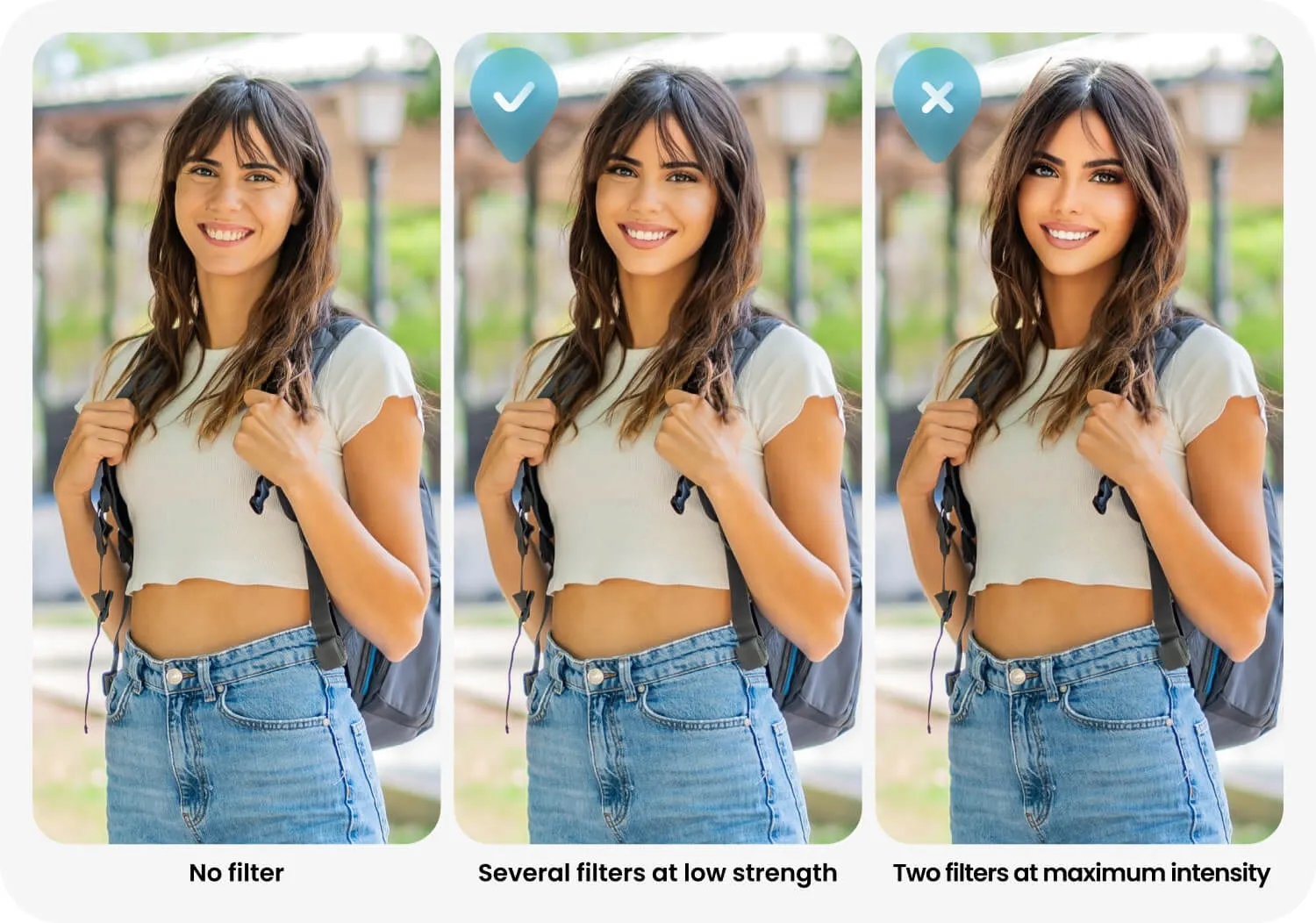
After applying each filter, adjust the Filter Strength slider and compare the result with the original. Several face filters at low strength often look more natural than one or two filters at maximum intensity.
Mistake: Inconsistent edits across photos
A photo series looks more polished when every image follows the same visual direction.
Use one main filter or preset across the series, then adjust its strength for each photo. FaceApp presets let you save a combination of filters and apply it to other images.
Color filters can also be added to Favorites. This gives you quick access to the same visual style when editing future photos.
The settings do not need to be identical. Lighting and skin tone may vary, but the overall color and editing style should remain consistent.
Mistake: Editing without knowing when to stop
Overediting usually builds gradually. A little more brightness, another face filter, stronger contrast, then one more correction. Each change may seem small, but together they can remove skin detail, flatten the light, and make the face look less natural.
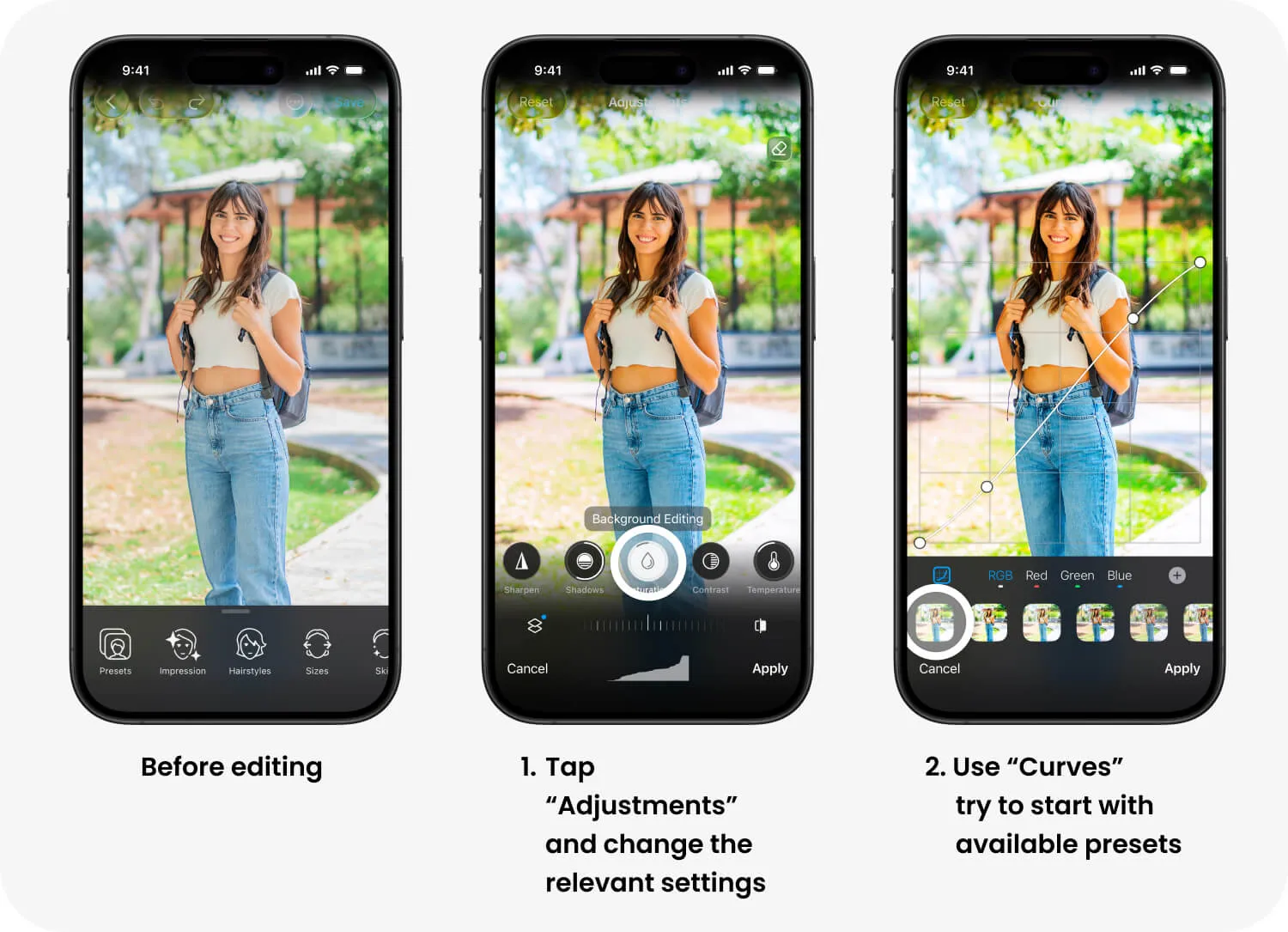
First decide what the photo actually needs. If the issue is lighting, open Adjustments and change only the relevant settings. Brightness, contrast, highlights, and shadows can all be controlled with simple sliders.
Make one correction at a time and compare the result with the original. If the face becomes brighter than the neck, the skin loses texture, or facial features begin to look unfamiliar, reduce the effect.
For precise tonal and color correction, iOS users can use Curves. Start with an available preset or create a custom curve. Small changes are usually enough.
How to edit photos naturally and know when to stop
Start by identifying one specific problem. It might be uneven lighting, a small skin imperfection, or a color tone that feels wrong. Apply the tool that solves that problem before adding anything else.
After every change, compare the result with the original. Pay attention to skin texture, facial features, and lighting. If the face looks noticeably brighter than the neck, the skin becomes too smooth, or an effect attracts more attention than the portrait, reduce its strength.
Check the image at normal size. An edit that looks subtle while zoomed in may appear too strong when you view the full photo. It can also help to pause briefly before the final check, as your eyes quickly adapt to stronger effects.
The photo is usually finished when the original issue has been corrected, the face still looks recognizable, and no individual effect stands out. A good edit should feel like a good photo, not visible processing.
Read our Tips and Tricks on natural editing.