' href='data:image/webp;base64,UklGRp4BAABXRUJQVlA4IJIBAACQBwCdASogACAAPqU+mkmmIyKhN/qoAMAUiWwAnSBCcAEoB0m+BVZ/aX2BcDrR3fSouezwc+Vyrapdh6o8Yfq+InkQMYAA/vCsntJ1u7+yqDKqYTbV6xr3qLRh5CyaVZap+G87c90MMp3Do52cHqZ0Sb/GN8LXD/3/PZK6/xxr3kAOxIpyMWY02GCocbluUjG2593Jb/AjiFJxPcNzx5x0Jxkr5wGvgs/3edgR5w/LwHdwoZf1WOm6bF9T/IwUMYar3FBFLYkp4eFNAttHdz/joPFacEibCjLGvPGpYv6s85A/V+x3/z7Puk8JzccZG3pM709NPK8iGnEXHWo5YyzmqTMJVyS6+1Pw1hwcFmaKItnn+Cr/MZ0X3b+1NNIA+nMMvmpaA795Jjp114DbK1z/CDUqW6S2+ppN4cljW02NP8puIOtOIX5pOn8XK3XaknDQpcfW/eXmlKvzJPfTWgpsUSOsPsPpxPN8ntY54S2WhW8B41PRZkeJHIQ+gOsFQnNJhaGfDKZY9laC14tpY4IoAAA='/%3E%3C/svg%3E)

Beard or No Beard? Let FaceApp’s Beard Filter Decide
Table of Contents
- Beard and mustache styles
- How to try on beards and mustaches
- Transfer: Try a beard from a photo
- FAQs
We can beat around the bush (pun very much intended) all we want, or we can cut straight to the chase: yes, growing a beard or mustache can completely change the way you look. In some cases, it might even make you unrecognizable, although we’ll leave that particular scenario to your search history.
But as your elders have probably reminded you a million times, just because you can do something doesn’t necessarily mean you should. Advice you should totally ignore when it comes to ordering dessert, but one you’ll find surprisingly sound when it comes to facial hair. All this to say, there’s a fine line between a beard that makes you look devastatingly handsome and one that makes your friends wonder whether you’re going through something.
Which brings us to you. If you’re here, chances are you’ve been entertaining the idea of growing a beard or trying a mustache, but you’re not quite ready to commit to weeks of awkward stubble only to discover that your face and your facial hair have irreconcilable differences.
We don’t have a fast-forward earth-rotation button or a crystal ball. But what we do have is the next best thing: a FaceApp beard filter that lets you see what you’d look like with a beard or mustache before you grow a single hair.
Beard and mustache styles worth trying
We firmly believe facial hair can do a lot of heavy lifting for your appearance. And it’s not just us—search interest in “beard glow-up” transformations and sculpted beard fades has skyrocketed by over 700% as men everywhere look to completely change their look. Here are a few styles to put to the test before committing to the real thing.
Short and full beards
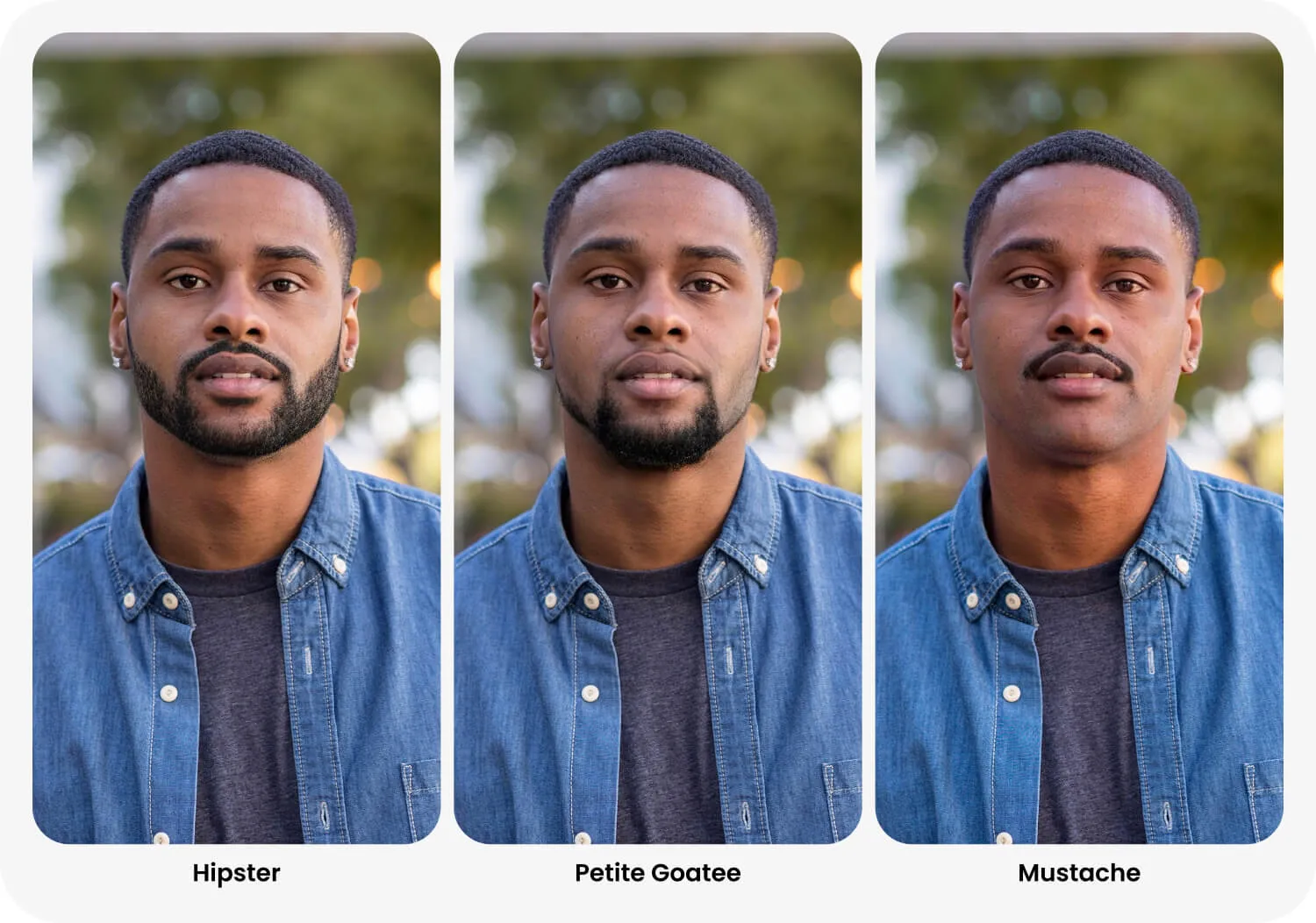
Hipster: A short beard with a mustache and neatly defined edges. The best place to start if you’re curious about facial hair but aren’t ready to buy a red-and-black checkered flannel shirt and go full lumberjack.
Full Beard: Thick, full coverage, mustache included. If noticeable transformation is what you’re after, this is a style that doesn’t believe in doing things halfway.
Lion: A beard that frames the chin and jaw without putting much emphasis on the mustache. Try it to see what a little extra definition around the lower half of your face can do.
Take it on the chin
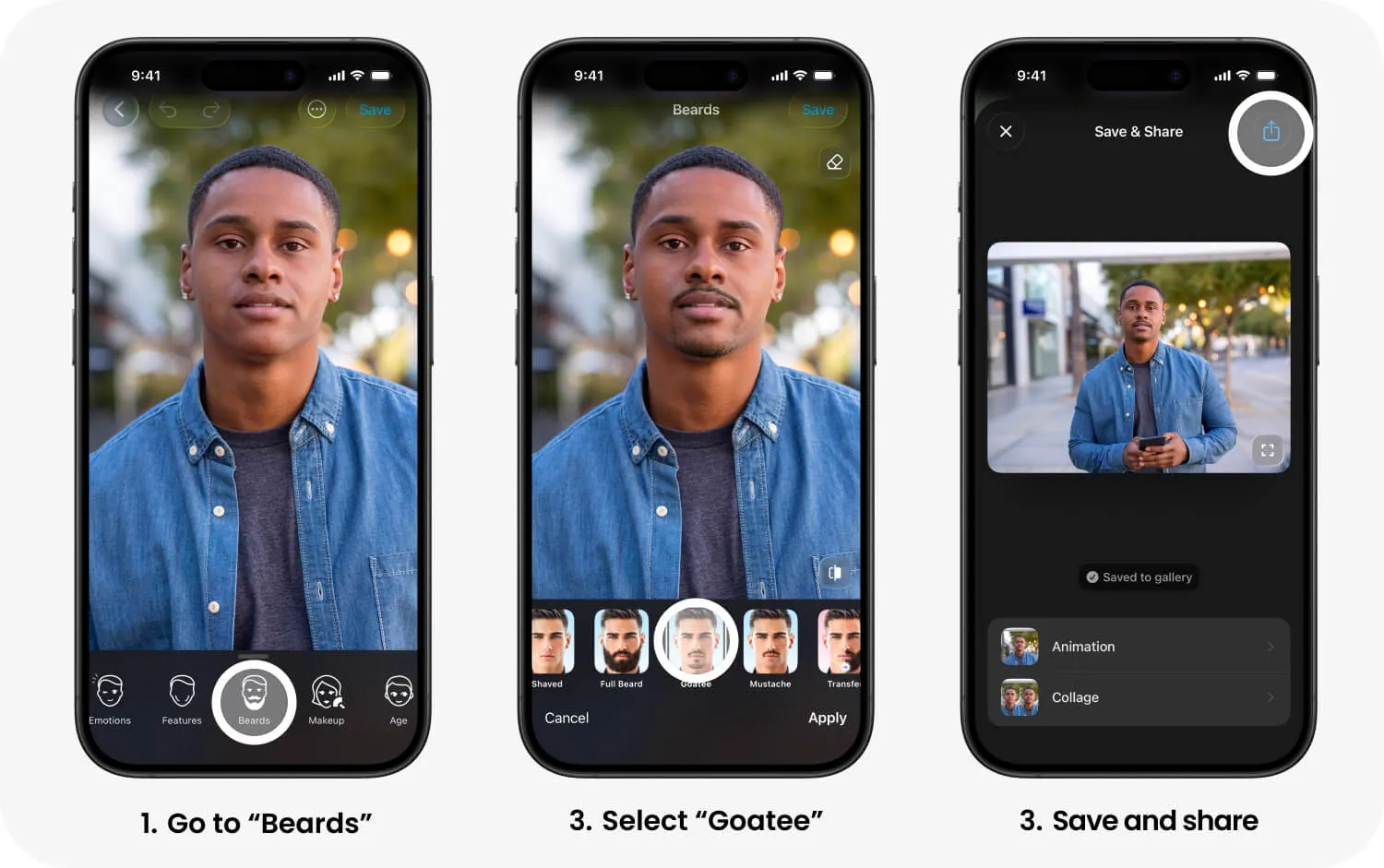
Goatee: A mustache and a small beard around the chin, with the cheeks left bare. For anyone who wants facial hair without committing their entire face to the cause.
Grand Goatee: A fuller, wider take on the classic goatee. It draws attention to your mouth and chin, making it worth a try if you’re curious about changing your face’s proportions.
Petite Goatee: Smaller and more understated, this one lets you experiment with a little chin hair without making a major departure from your usual appearance.
Mustache or clean-shaven?
Mustache: No beard, just upper-lip real estate. It’s a surprisingly small change that can make a surprisingly big difference. Whether you’re going for leading man or eccentric uncle is another matter entirely.
Shaved: Sometimes the biggest transformation involves taking something away. If you’ve been hiding behind a beard for years, here’s your chance to get reacquainted with the face underneath.
And don’t forget the Original, a.k.a. your starting option. Switching between your starting photo and the edited versions makes it easier to see which styles complement your features and actually feel like you.
How to try on beards and mustaches
- Open a photo in FaceApp and select Beards.
- Tap a filter to try it.
- Explore a few styles on the same photo to compare their shape and fullness.
- Tap Apply to confirm your edit, then Save to keep the photo.
For a natural result, use a clear portrait with even lighting and an unobstructed chin.
Transfer: Try a beard from a photo
Spotted a beard in the wild (online or a movie, perhaps) you wouldn’t mind seeing on your own face? Download it or take a screenshot. Then head to Beards, select Transfer, and upload a photo from your gallery. The final step? See for yourself if it actually looks as good on your face as it did in your mind. It’s a handy way to experiment with a particular look you’ve been eyeing rather than limiting yourself to the preset styles.