' href='data:image/webp;base64,UklGRvQBAABXRUJQVlA4IOgBAABwCQCdASogACAAPrVInkmnJCKhMAgA4BaJaACdMoR7ToK9FtgOe30wDeYLMEaQ9t1wjmPoB/lsnngNDnMJgBdc6l5BPvazmmgXBTmFda+kUVH8/2AA/vqkf9E3+9cat/rYMFth++e/uXIyvjfBVGm6FGSx8fVboSPrLn63GTqE+lsnoFC/EDRiH+S9ljQSz6BHHHMX0xFV1R1+M3uHn++k25gP/eLdukP0k5PMAEg4+n/k52FqP8IlSeObRJtj1Vjd+1ddMnsg6kf//MYVhXUpqPdvkV82Ki2A3CL8NW7v3wkemT4/4eCQis3vo3Nj/Jt/+6KmVQxV75itWd4/YqR0mLU6/+MX3X+I973U4qV8fy3gi7w/wK/+aHDyVsAeGlFvuWDduepKQ/XD76MEusozA3cU1fgeFzzhEDMN6zr0+0/j0QGTxnWJoZqYZVTv0GyBOmXlybTUOeda/Uj67SNyvAc7T/ObE5X7YgntZvhlk8x21g3M0M/TXtfJgE1la795lLvooi6xM0fuU/6WhBh9FM9fHPec18hMQsOiYtmgPSTwCMktKzYPYP7bts6c3Q8WadVGSsw6dpFKWosy86R8LyVT680UrBFgD2l7CzMyNUJH5GVEW0TxeglS8BGm3m/rVTmBo4AAAA=='/%3E%3C/svg%3E)

FaceApp Filters: Impression
Explore the FaceApp Impression filter group and create a polished portrait in one tap.
Table of Contents
- What do Impression filters do?
- What are all the Impression filters?
- How do you use Multiselect?
- FAQs
What Impression filters do
Impression filters create a complete portrait look in one tap. They work with several facial details at once, making a photo softer, fresher, more expressive, or more cinematic while keeping the person recognizable.
Instead of editing each facial detail separately, Impression filters create one coordinated look for the entire face. You can apply a single ready-made style or combine several filters to create a more personal result.
These are some of the most popular FaceApp filters, designed to turn an ordinary photo into a polished selfie with one tap.
Every Impression filter
Revamp 2 softly refreshes the face while keeping the result natural. It has five strength levels.
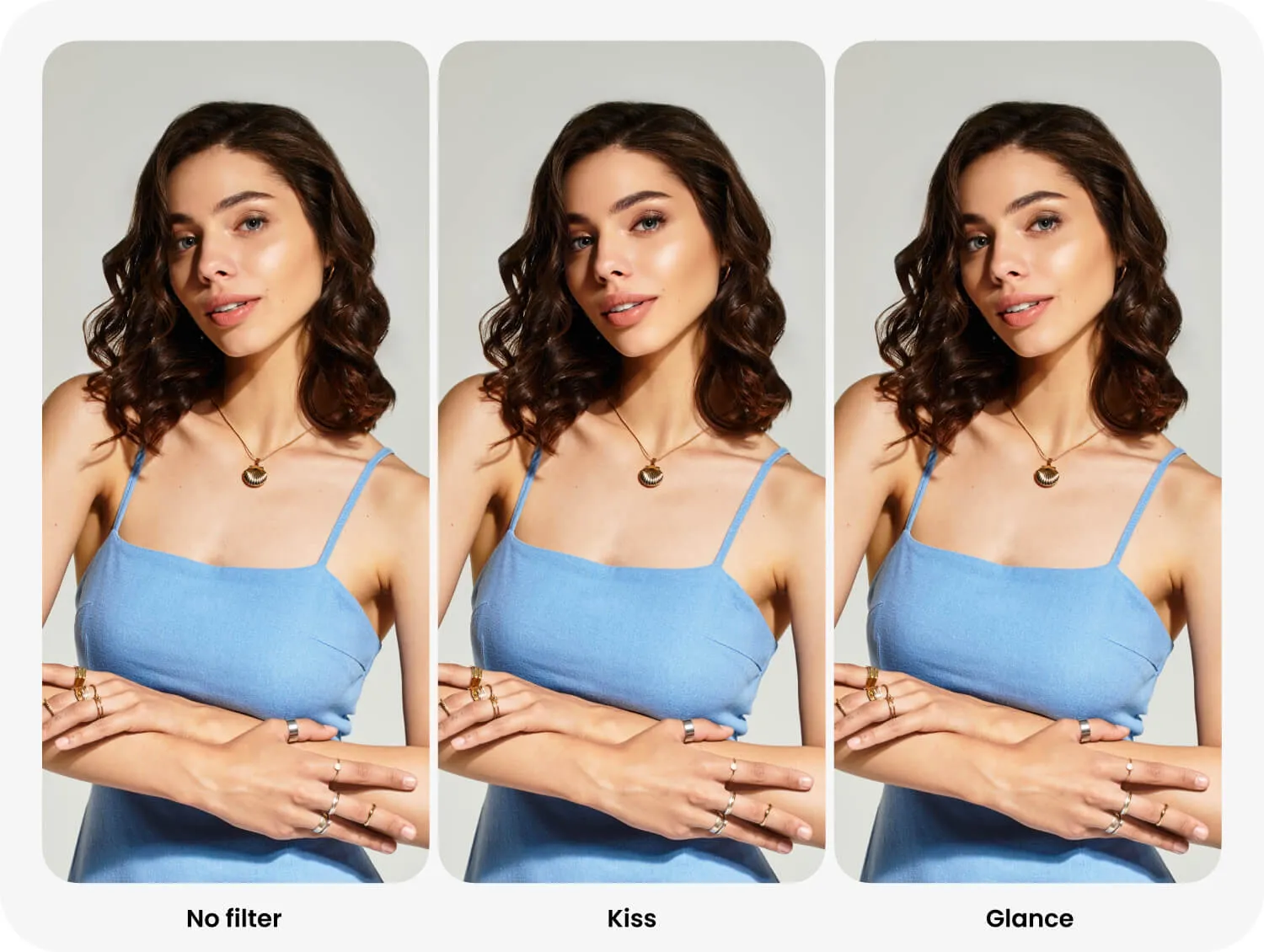
Kiss enhances the eyes and lips, making the portrait softer and more expressive. It has four strength levels.
Hollywood is one of FaceApp’s signature filters and a classic look many users recognize the app by. It creates a polished studio portrait, adds definition to facial features, and keeps the result balanced. It has five strength levels.
Hollywood 2 is an alternative version of Hollywood with its own subtle visual differences. It works in a similar way and creates the same polished portrait feel.
Cute softens facial features and creates a lighter, more open expression. It has five strength levels.
Muse adds a refined editorial mood and makes facial features more defined. It has five strength levels.
Silk makes the skin look fresher and more even while giving the portrait a soft finish. It has four strength levels.
Charm adds subtle polish while preserving a natural and recognizable appearance. It has four strength levels.
Revamp gives the portrait a stronger overall refresh than Revamp 2.
Passion enhances the gaze and creates a bold beauty look. It has five strength levels.
Grace creates a balanced, clean, and elegant portrait.
Glance draws attention to the eyes and makes the gaze more expressive. It has four strength levels.
Movie adds cinematic definition and creates a more camera-ready portrait. It has five strength levels.
How to use Multiselect
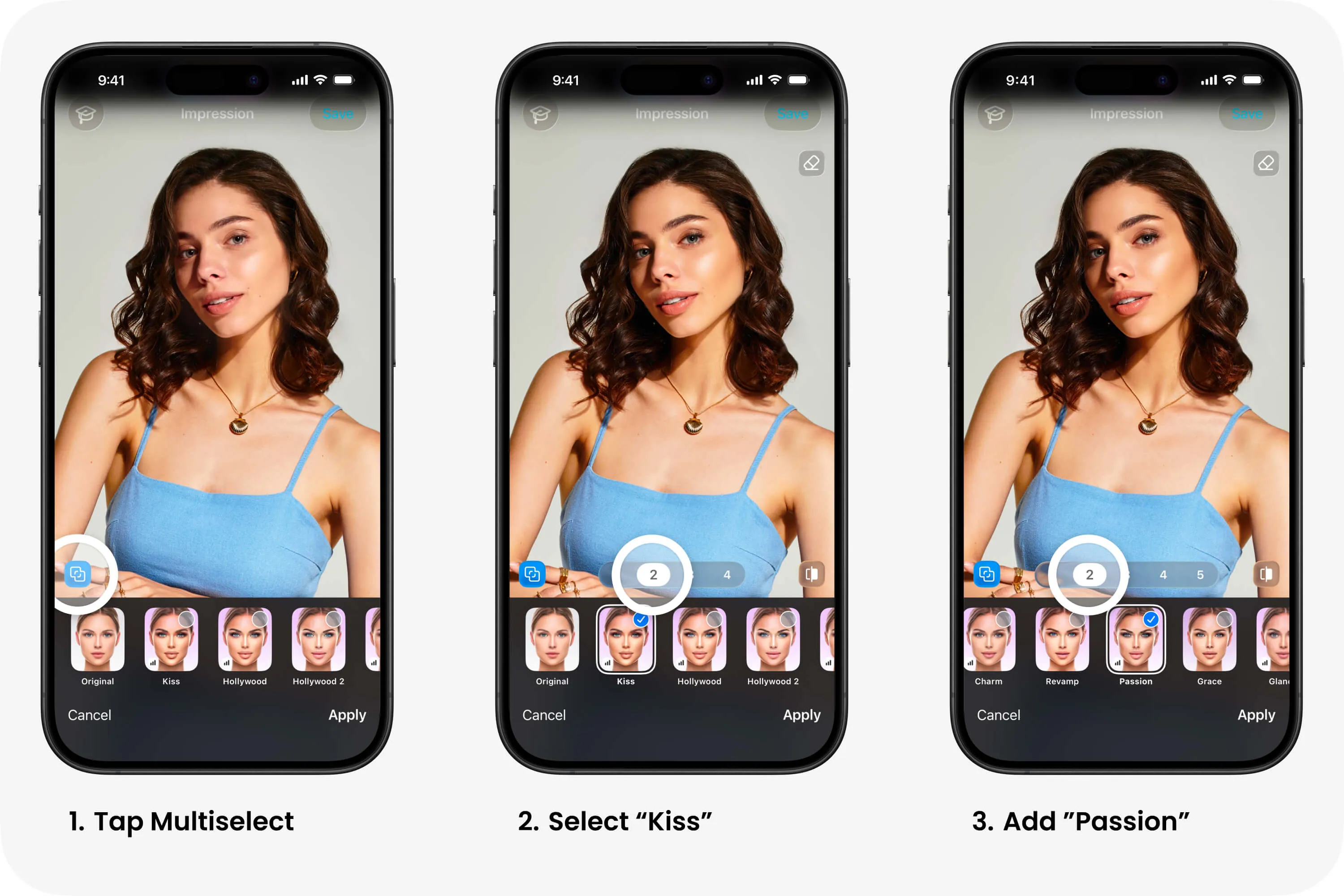
Tap Multiselect to activate multiple filter selection. You can then choose any combination of Impression filters and build your own portrait look.
Avoid combining several filters at high strength. Lower levels work better in combinations because the effects support each other without making the face look overedited.